


What Is RAM and Why Does It Matter
RAM, or Random Access Memory, is one of the most critical components in any computing device. It directly influences system speed, multitasking capability, gaming performance, and overall responsiveness. When we power on a computer, laptop, or smartphone, RAM becomes the active workspace where data is temporarily stored for quick access by the processor.
Unlike storage devices such as SSDs or HDDs, RAM is volatile memory, meaning it stores data only while the system is running. The moment the device shuts down, the data in RAM is cleared. This temporary yet ultra-fast storage layer allows applications, operating systems, and background services to operate smoothly without delay.
In modern computing environments, sufficient RAM is no longer optional. It is a foundational requirement for productivity, gaming, content creation, and enterprise workloads.
How RAM Works Inside a Computer
RAM works as a high-speed bridge between the CPU and storage. When we open a program, the system loads necessary files from the storage drive into RAM. The processor then accesses these files directly from memory rather than repeatedly retrieving them from slower storage.
This process dramatically reduces latency and improves real-time performance. The larger and faster the RAM, the more data the system can handle simultaneously without slowdowns.
Key performance aspects include:
-
Memory capacity, measured in gigabytes
-
Memory speed, measured in MHz
-
Latency timings, which determine responsiveness
-
Memory channels, such as single-channel or dual-channel
When optimized properly, RAM enhances system efficiency and minimizes bottlenecks.
Different Types of RAM
Understanding the various types of RAM is essential for selecting the right configuration.
DRAM and SRAM
There are two primary categories:
-
DRAM (Dynamic RAM) is the most common type used in personal computers.
-
SRAM (Static RAM) is faster but more expensive and typically used for cache memory.
Most consumer devices rely on DRAM due to its balance of cost and performance.
DDR RAM Generations
Over the years, RAM technology has evolved into multiple generations of DDR memory, each offering improved bandwidth and energy efficiency.
-
DDR3 was widely used in older systems.
-
DDR4 became the standard for modern desktops and laptops.
-
DDR5 represents the latest generation, delivering significantly higher speeds and improved power management.
Each generation is not backward compatible. A motherboard designed for DDR4 cannot support DDR5 modules.
RAM Capacity: How Much Do You Really Need
Choosing the correct RAM capacity depends on how we use our system.
8GB RAM
Suitable for:
-
Basic office tasks
-
Web browsing
-
Light multitasking
-
Streaming
16GB RAM
Ideal for:
-
Gaming
-
Professional multitasking
-
Moderate video editing
-
Content creation
32GB RAM and Above
Best for:
-
High-end gaming
-
4K video editing
-
3D rendering
-
Virtual machines
-
Heavy software development
For most modern users, 16GB RAM provides the best balance of cost and performance.
RAM Speed and Performance Explained
RAM speed, measured in MHz, determines how quickly memory can transfer data. Higher MHz generally means better performance, especially in tasks such as gaming and creative workloads.
For example:
-
DDR4 typically ranges from 2133 MHz to 3600 MHz.
-
DDR5 can exceed 6000 MHz.
However, raw speed is only part of the equation. CAS latency also affects performance. Lower latency means faster response times.
When we combine high frequency with optimized timings, we achieve superior real-world results.
Single Channel vs Dual Channel RAM
Memory channels impact bandwidth.
-
A single channel uses one memory module.
-
Dual-channel uses two identical modules to double the memory bandwidth.
A dual-channel configuration significantly improves performance in gaming and multitasking scenarios. For best results, we install matched RAM sticks in the correct motherboard slots.
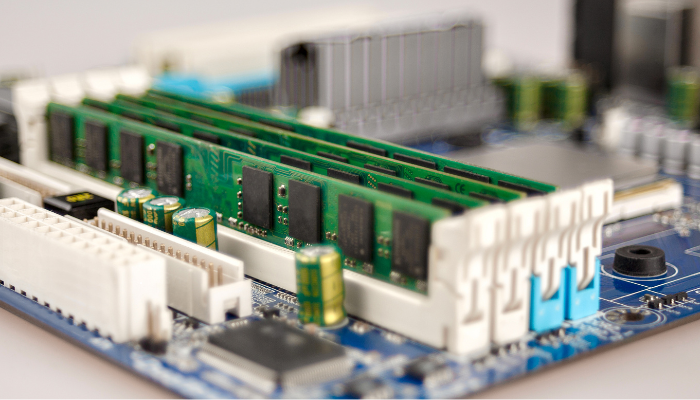
RAM for Gaming: What Delivers the Best Experience
Gaming performance heavily depends on sufficient and fast RAM. Modern AAA titles require:
-
Minimum 16GB RAM
-
High-frequency modules
-
Dual channel configuration
RAM directly affects frame stability and load times. Insufficient memory can cause stuttering, lag spikes, and crashes.
Competitive gamers often prefer high-speed DDR4 or DDR5 memory to maximize frame rates and system responsiveness.
RAM for Laptops vs Desktops
RAM design differs slightly between laptops and desktops.
-
Desktop RAM uses DIMM modules.
-
Laptop RAM uses smaller SO-DIMM modules.
Some laptops allow RAM upgrades, while others feature soldered memory that cannot be replaced. Before upgrading, we must confirm compatibility with the motherboard and the maximum supported capacity.
Upgrading RAM: When and Why to Do It
Upgrading RAM is one of the most cost-effective ways to boost performance.
Signs that indicate a RAM upgrade is needed:
-
Frequent system slowdowns
-
Applications freezing
-
High memory usage in the task manager
-
Long load times
By increasing memory capacity, we reduce reliance on virtual memory, which uses storage space and slows down performance.
The upgrade process typically involves:
-
Powering down the system
-
Opening the case or laptop panel
-
Installing compatible modules
-
Enabling XMP or EXPO profiles in BIOS for optimized speed
RAM and Multitasking Efficiency
Multitasking requires available memory. When we open multiple browser tabs, productivity apps, and background programs, each consumes RAM.
With limited memory, the system swaps data to storage, creating delays. Adequate RAM ensures:
-
Seamless switching between apps
-
Faster workflow
-
Reduced system strain
Professionals working with large datasets, spreadsheets, or creative software benefit greatly from higher RAM configurations.
ECC RAM vs Non-ECC RAM
ECC RAM, or Error Correcting Code memory, is designed for servers and workstations. It detects and corrects memory errors automatically.
Non-ECC RAM is used in consumer desktops and laptops.
ECC memory is ideal for:
-
Enterprise servers
-
Scientific computing
-
Financial systems
-
Mission-critical applications
For standard users, non-ECC RAM provides excellent performance at a lower cost.
Overclocking RAM for Advanced Performance
Advanced users sometimes overclock RAM to push performance beyond factory settings.
This process involves:
-
Adjusting frequency
-
Modifying voltage
-
Tuning latency timings
While overclocking can improve speed, stability testing is crucial. Proper cooling and motherboard support are essential for safe operation.
The Relationship Between RAM and Storage
RAM and storage serve different roles but work together.
-
Storage keeps permanent files.
-
RAM provides a temporary workspace.
Solid State Drives improve load times, but without sufficient RAM, system performance remains limited. A balanced configuration ensures an optimal computing experience.
Common RAM Myths Debunked
There are several misconceptions about RAM:
-
More RAM does not always increase speed if the current capacity is underutilized.
-
Mixing different RAM speeds can reduce overall performance.
-
Higher MHz does not compensate for extremely high latency.
Understanding specifications allows us to make informed decisions rather than relying on assumptions.
Future of RAM Technology
The evolution of memory continues with innovations such as:
-
Higher DDR5 speeds
-
Improved power efficiency
-
Enhanced memory architectures
-
Integration with AI-driven systems
As software becomes more demanding, RAM capacity and performance will remain central to system advancement.
How to Choose the Best RAM for Your Needs
When selecting RAM, we consider:
-
Compatibility with the motherboard
-
Supported memory generation
-
Capacity requirements
-
Frequency and latency
-
Budget constraints
-
Brand reliability and warranty
A well-balanced configuration ensures long-term stability and performance.
Final Thoughts on RAM Performance and Optimization
RAM is the backbone of modern computing performance. From casual browsing to professional workloads, it determines how efficiently our systems operate. By choosing the right capacity, speed, and configuration, we unlock smoother multitasking, faster gaming, and enhanced productivity.
Whether upgrading a desktop, optimizing a gaming rig, or configuring a workstation, strategic RAM selection transforms overall computing efficiency.


, including types, speeds, capacity, gaming performance, laptop, and desktop upgrades.)